Introduction
In early September 2025, a shocking ransomware attack targeted Jaguar Land Rover’s production facilities in the UK, halting operations and highlighting the severe vulnerabilities companies face today. This attack was just one in a wave of rampant cyber threats that year, which also included a massive third-party breach compromising Salesforce data across multiple SaaS providers and a hyper-scale DDoS attack that utilized over 1.7 million infected IP addresses globally.
For website owners, these threats are a stark reminder that choosing a web hosting service with robust cybersecurity is not just technical prudence but a vital commercial decision. Asking the right security questions before committing to a hosting firm can be the critical difference between safeguarding sensitive data and suffering a catastrophic breach with costly consequences.
 Introduction
10 Security Questions to Ask Your Hosting Provider — Dotzo’s Recommendations
At Dotzo, we believe that securing your website starts by asking the right questions before trusting any hosting provider with your precious data. Here’s what we recommend you ask to ensure ironclad protection.-
What safety steps have been taken?
At Dotzo, every VPS setup comes with malware scanning, real-time intrusion detection systems (IDS/IPS), and robust firewalls. We automatically monitor and halt brute force attempts before they reach your site — transparency means you can see alerts and logs anytime. -
Do you stop DDoS attacks from happening?
Our unique DDoS mitigation technology ensures your site stays live even under massive attack volumes. Unlike generic protection, Dotzo’s adaptive filters dynamically block harmful traffic without disrupting genuine users. -
How do you copy your info and get it back?
Dotzo performs automatic daily backups stored securely in geographically separate locations. In case of incidents, data restoration can be initiated through your control panel and typically completes within minutes. -
Is your data safe during storage and transit?
We enforce strong encryption standards like AES for data-at-rest and TLS 1.3 for data-in-transit. This ensures even intercepted data is unreadable to unauthorized eyes. -
What kinds of authentication and access controls do you provide?
Dotzo supports and enforces two-factor authentication (2FA) for all client logins and restricts server access through role-based permissions to minimize risk. -
How quickly do you apply security and software updates?
Our managed VPS hosting services include automated patch management. Dotzo applies critical security updates within hours to keep your server and applications secure. -
What are your SLAs and uptime guarantees?
Dotzo guarantees 99.99% uptime backed by transparent SLAs that include accountability for security incidents and response times. -
What steps do you take to protect your network?
You want network segmentation, enterprise firewalls, traffic inspection, and multi-carrier redundancy. Dotzo runs workloads across global data centers (Netherlands, USA, Russia) with multi-carrier redundant networking, enterprise firewalls, and always-on DDoS filtering at the network edge to keep attacks away from your server in the first place Mini case study – DDoS resilience for a growing SaaS: A SaaS startup hosting APIs on Dotzo’s unmetered 10 Gbps dedicated servers experienced repeated traffic spikes from an abusive botnet. The upstream DDoS filters and premium network line (up to 10 Gbps with basic DDoS protection) absorbed the attack, allowing API latency to remain usable and preventing customer churn. -
Do you provide full root access and ensure it’s safe?
You are in full control with root access on Dotzo’s VPS plans, balanced with managed security options to keep your environment protected without sacrificing flexibility. -
What security support do you offer?
Dotzo offers 24/7 dedicated security response teams ready to assist immediately with any threat or breach, minimizing downtime and damage.
Secure Hosting Checklist
Use this quick checklist when comparing providers:- Always-on DDoS protection with clear capacity (e.g., up to ~40 Gbps at Dotzo).
- Firewalls, IDS/IPS, and automated malware scanning on all VPS/dedicated plans (standard at Dotzo).
- Automatic, scheduled backups with guided restore options (available on Dotzo-managed VPS).
- High uptime SLA (99.9%–99.99%) with credits if the guarantee is missed (offered by Dotzo).
- Global data centers, redundant networking, and 24/7 NOC-style monitoring (part of Dotzo’s infrastructure).
- Secure access: full root plus hardening support, not full root with no guardrails (Dotzo’s model).
Conclusion
Your data is only as safe as the systems protecting it. When you ask the right questions, you quickly see whether a hosting provider understands security or is simply hoping nothing goes wrong. The goal isn’t just to keep your website online — it’s to make sure your customers’ information, your business data, and your entire digital presence stay protected around the clock. If a provider struggles to answer these basics, that’s a sign to move on. If they can answer them clearly — and back their claims with real safeguards — you’re in good hands. At Dotzo, security isn’t an add-on. It’s built into every plan, every server, and every layer of our infrastructure, so you can grow your business without worrying about what’s happening behind the scenes.
Ready to Host Securely with Dotzo?
If security, uptime, and expert support matter to your business, this is the moment to treat hosting as a strategic decision, not a commodity. Explore Dotzo’s Managed cPanel VPS and high-bandwidth dedicated servers to get DDoS protection, performance, and hands-on security help in a single, SLA-backed package.
Introduction
Cloud hosting is the greatest option for businesses that want to grow because it is the most flexible, affordable, and reliable from a technological perspective. These are all very critical for most startups during the moments of growth when things are not solid. Platforms like dotzo.net have a major advantage since they offer customized assistance, many resources, and managed services that are specifically designed to help businesses grow from the ground up to the point where they can scale up.
 Introduction
Why it’s important for new businesses to be able to grow
Being able to quickly adjust to changes in the market can make the difference between success and failure for new firms. Cloud hosting helps organizations modify their processing power in real time to keep up with sudden growth without having to wait for or pay for updates to their physical infrastructure. You may easily scale up or down by altering settings on your dashboard, whether you’re adding a new feature or dealing with an unexpected surge in traffic. You don’t have to acquire extra servers or haggle over hardware purchases. - You may quickly add more RAM, CPU, or storage as your needs change without having to pay for downtime or migrations.
- Start small and grow as your firm does. Such an approach makes it less likely that you’ll use too many resources.
- Monitoring resources in real time can prevent services from slowing down or stopping when a large number of users are using them.
The Best cost-effectiveness
For any new business, cash flow is the most critical factor. One of the best things about cloud hosting is that you only have to pay for what you use. TThis approach is known as a pay-as-you-go model. This way, new businesses don’t have to spend a lot of money on hardware up front and pay for continuing maintenance. Instead, startups can allocate that money towards developing new products, advertising, or hiring employees.- You don’t have to spend a lot of money on hardware right away; you can get resources as you need them.
- Stop paying for the upkeep, upgrades, or repairs of physical servers.
- To keep startups from spending too much on technology, move money to growth or innovation.
A lot of uptime and dependability
Being down is the worst thing that can happen to a startup. Cloud hosting is particularly safe because it stores data and workloads on numerous virtual servers. This redundancy keeps services running smoothly, makes sure they are always available, and offers disaster recovery features that are very critical for business continuity. - Storing data on more than one server decreases the risk of hardware failures.
- If something goes wrong in your area, geographic redundancy allows you switch to another site fast.
- Reliable uptime helps companies gain the trust of clients and consumers from the outset.
Fast Deployment and Fresh Ideas
Startups need to act swiftly, whether it’s to add new features, test them, or update the ones they already have. Cloud hosting cuts down on the significant wait times of traditional IT infrastructure, making deployments quick and rollbacks simple. With real-time setup, business owners can try out new ideas, run A/B testing, and make adjustments in only a few minutes. This helps them keep their development cycles short. - You don’t have to worry about infrastructure when you deploy and test new apps automatically.
- Make it easier to move or grow without any downtime and very little technical risk.
- Using contemporary development tools may make the CI/CD process easier for agile teams.
Managed support and strong safety
New firms may find it challenging to establish strong security and compliance from the ground up. Most reputable cloud hosting businesses include extensive security features like encryption, firewall protection, regular backups, and persistent monitoring as standard. This approach helps new businesses remain secure and comply with regulations without incurring high costs for security personnel.- Access control, security cabinets, proactive monitoring, and options for automatic backups.
- If your infrastructure is ready for compliance, you can expand your firm in regulated industries.
- Outsource most of your daily security job so you can use your own resources to do what makes your business stand out.
How Dotzo Can Help New Companies
Dotzo provides ambitious businesses with a suite of tools designed for teams that aim to grow quickly:- Managed Cloud Services: Dotzo has Linux and Windows VPS, Cloud, and Dedicated servers that you can fully control. They can manage any amount of labor, from MVPs to programs that are really important to the mission.
- Location-Specific Performance: Choose from a number of datacenter locations across the world to give your users the lowest possible latency. This is especially significant for organizations that use technology and software as a service.
- SLA-Backed Uptime: With strong uptime guarantees and proactive infrastructure monitoring, you can be sure that your service will always be available.
- Free Migration and Technical Support: Dotzo makes it easy for business owners to switch from old platforms by giving managed migrations, free cPanel, and a support team that is always there to help with difficulties or give suggestions on how to improve things.
- Plans that allow you pay as you go: No commitments or setup fees. You can add or remove services as needed to keep expenses reasonable and easy to anticipate.
Why Dotzo is the Best Place for New Businesses to Grow
Dotzo makes it easier to grow by using modern cloud technologies and providing hands-on help. This allows business owners focus on the most important things: developing a great product and keeping customers pleased. The platform is ideal for companies that seek rapid growth but lack substantial financial resources, as it is user-friendly, offers transparent pricing, and provides 24/7 availability.- We have more than 5,600 clients, including fast-growing businesses from three different regions of the world.
- The architecture emphasizes performance by using SSD storage and high-speed bandwidth to enhance speed.
- There are several levels of service available, ranging from fully managed options for founders with limited technology knowledge to self-managed solutions for more experienced teams, allowing your hosting to grow alongside your business.
- Dotzo’s hosting service is designed to help you grow and innovate from the ground up to the unicorn stage.
- Dotzo is the greatest long-term partner for businesses who wish to exploit the cloud’s unmatched speed, efficiency, and reliability. This support allows founders to generate new ideas without worry and to expand with confidence.
Conclusion
Dotzo makes that cloud benefit useful and easy to use for founders at all stages, from MVP to hyper-growth. Teams don’t have to worry about servers, security, or migrations anymore. They can focus on making a better product and getting more customers, knowing that their hosting partner can keep up with their plans. Dotzo is more than just another hosting service for startups who want to develop quickly without investing too much or making their tech stack too complicated.
Introduction
Most beginners don’t mess up building the website. They mess up choosing the host. Especially when it comes to choosing a web hosting service. If you choose the wrong web host or make many mistakes, you could have technical problems, slow performance, security holes, and lost visitors. Web hosting is like the foundation of your online presence. This guide for beginners shows the most common mistakes individuals make while hosting a website and how to avoid them. It also talks about why Dotzo.net can be an excellent solution for people who are new to running a website.
Most issues beginners face—slow sites, lost data, hacked pages, poor uptime—come from choosing the wrong hosting provider. Here’s how to avoid that.
 Introduction
Fundamental Steps to Avoid Website and SEO Disasters
- The type of website it is, like a blog, portfolio, store, or streaming site
- Expected amount of traffic (today and in the future)
- Needs for things like CPU power, RAM, and disk space
- Requirements for security and uptime
Choose balanced pricing, not the cheapest plan
- Find hosts that promise at least 99.9% of the time that their servers will be available.
- If you want your site to load faster, choose SSD storage instead of regular HDD.
- Check to see if the bundle includes security features like SSL certificates and DDoS protection.
- Check to see if support is available and what people say about it.
Avoid security blunders every beginner makes
- Choose a host that provides out free SSL certificates, such as Let’s Encrypt.
- Use strong passwords for your admin account and enable two-factor authentication whenever possible.
- It offers DDoS protection to limit the damage caused by attacks.
- You should always back up your website, even if your provider does so.
- Dotzo offers new users, who are concerned about security gaps, free SSL, built-in DDoS protection, and weekly backups to enhance their data security.
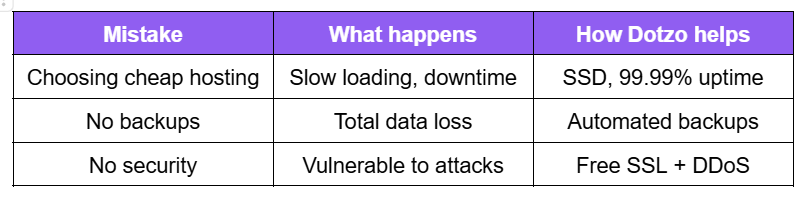
Ready to start without making these mistakes? Launch your website on Dotzo’s beginner-friendly hosting.
There are many different kinds of web hosting, including shared hosting, cloud VPS, dedicated servers, and more. Depending on what you need and how much money you have, each one has its pros and downsides. Some people who are just starting out select shared hosting since it’s cheap, but it could get slower as traffic grows. Some people switch to VPS or dedicated servers too soon and pay too much for things they don’t need yet. Dotzo is a pro at Cloud VPS and Managed VPS hosting. They provide new users a controlled environment with performance that can grow with their site, so they don’t have to worry about managing a sophisticated server as their site grows. Choose a Host with Great Customer Service
- Technical problems will come up, and beginners need help fixing them right away. People get furious when they don’t get adequate help, and this can lead to significant periods of outage.
- There are a few options to obtain support, like chat, tickets, and the phone.
- Technicians who are very familiar with your hosting platform
Why Dotzo is a Great Place for Newbies to Host
Dotzo knows how to help new business owners get their businesses online. They solve many of the concerns that new website owners have by offering SSD KVM VPS for only $5.99 per month. This includes advanced security features like 40 Gbps DDoS protection, free migrations, and a 99.99% SLA. You can pick between having full root access to control everything or managed choices with experienced The SolusVM control interface also makes it easy for new users to operate theirBy choosing Dotzo, beginners can avoid the following issues:s can avoid the following by choosing Dotzo:- Paying too much for things you don’t need
- Having trouble with service that is slow or not always available
- Security holes because there isn’t enough security
- Not enough technical support available
Start your website the right way.
Try Dotzo’s beginner-friendly hosting with fast setup, strong security, and 24/7 support.
Introduction
Here’s the thing—most people focus on keywords and backlinks when they think about SEO, but forget the foundation that keeps everything running: your web hosting. A slow server, poor uptime, or unsecured hosting can quietly hurt your rankings no matter how excellent your content is.
If you want Google to trust your website, you need hosting that supports speed, stability, and security right from the start. These three rules will show you exactly how hosting influences SEO and what beginners should look for before choosing a plan.
 Introduction
Rule 1: Prioritize Speed and Uptime
Website speed is more than just a user preference—it’s a core ranking factor in Google’s algorithm. Search engines favor websites that load quickly and consistently, not only on desktop but also across all mobile devices. Sluggish sites increase bounce rates, reduce the average time on page, and can significantly lower your ranking. Reliable hosting directly impacts your server response time and ensures minimal downtime, which signals both search engines and visitors that your website can be trusted.- Choose SSD-powered hosting for faster data delivery.
- Ensure your host offers an uptime guarantee (preferably 99.9% or better) so your site is always online and accessible.
- Ask about proactive server management and real-time monitoring—they minimize technical disruptions and search engine penalties.
Rule 2: Optimize Server Location and Target Audience
Where your server is physically hosted can affect your site’s loading times, latency, and geo-targeted search performance—especially critical for local businesses or internationally-focused startups. Google factors server location into its rankings, particularly for local search queries. A server close to your primary audience means faster load times and better ranking in the correct regional search results.- Choose a provider with data centers in or near your target market.
- Ask about integration with Content Delivery Networks (CDNs) to cache site resources and improve global performance if you have a global audience.
- Ensure your host leverages geo-IP targeting for local SEO boosts.
Rule 3: Demand Security and Technical Support for Continuous Ranking
A secure, well-maintained hosting environment builds trust with users and search engines alike. Google and other engines reward HTTPS-encrypted sites, penalize infected or hacked websites, and prefer domains that are consistently available. Your hosting provider should prioritize advanced security, regular updates, malware scanning, and included SSL certificates, all of which help protect your reputation and maintain your rankings.- Insist on free SSL certificates and automatic security updates.
- Choose a provider that offers 24/7 expert support so issues are resolved before impacting SEO.
- Dotzo includes SSL certificates, robust DDoS protection, and round-the-clock support with every plan.
“With 99.9% uptime instead of 99.5%, your site stays live ~44 hours more per year.”

Ready to Pick Hosting That Actually Improves Your SEO?
Most hosting mistakes come from choosing the cheapest plan or ignoring crucial performance features. When your rankings depend on speed, uptime, and security, your hosting needs to do more than just keep your site online. Dotzo’s SSD-powered hosting is built for search performance—fast loading times, 99.99 percent uptime, DDoS protection, and a support team that steps in before issues affect rankings. If you want a hosting plan that supports long-term SEO growth instead of slowing you down, explore Dotzo’s beginner-friendly options and start on the right foundation. → Launch a better-performing website with Dotzo today.Conclusion
Following these three hosting rules—maximize speed and uptime, choose the smartest server locations, and insist on top-tier security/support—lays the groundwork for lasting SEO success, and dotzo.net is designed to help you get there faster and smarter.
Introduction
“Most businesses think pay-per-use saves money — until they open the invoice.” On paper, pay-per-use hosting seems reasonable. You only pay for the bandwidth, storage, and computing power you use. Easy, right?
But here’s the thing most firms end up paying a lot more than they thought they would. Bills go up without warning, workloads grow in the background, and monitoring services contribute to the expense without anybody knowing. Companies don’t realize it, but they are spending 20 to 50 percent more than they meant to each month.
You’re not the only one whose cloud bill continues going up even when your traffic doesn’t. Let’s talk about why this happens, what the pay-per-use model really charges you for, and how to keep your cloud costs low.
 Introduction
 How the Pay-Per-Use System Works
Pay-per-use hosting charges you in real time for every resource that the system makes available to you. That includes CPU time for doing calculations.- CPU time for computing tasks
- RAM allocation
- Network bandwidth used
- Read/write operations
- Storage consumed
- Monitoring and API calls
Why This Quickly Gets Expensive
- Scaling happens even when you’re not paying attention.
- Resources that aren’t being used nevertheless count
- Egress costs pile up quickly
- Prices that are hard to understand mask the real cost
- The major problem is that autoscaling happens when you don’t expect it to.
Why Many Businesses Pay Too Much
Here’s what really causes cloud overspending:- Overprovisioning without realizing it :Developers sometimes chose higher-tier instances “just to be safe,” but these resources don’t get used enough. You pay extra for no real benefit.
- Paying for excessive monitoring or analytics: Cloud platforms charge for logs, metrics, alerts, and API calls. Your bill goes climb even if your traffic doesn’t when these add up.
- Data transfer charges: Every outgoing request, no matter how small, adds to the total cost. This is one of the cloud hosting costs that people forget about the most.
- Vendor lock-in: When a system relies on proprietary tools, it becomes difficult to move. You have to keep paying high rates.
- Low visibility: Most companies don’t have dashboards or tools that show them where their money is going. Without insights, spending too much becomes routine.

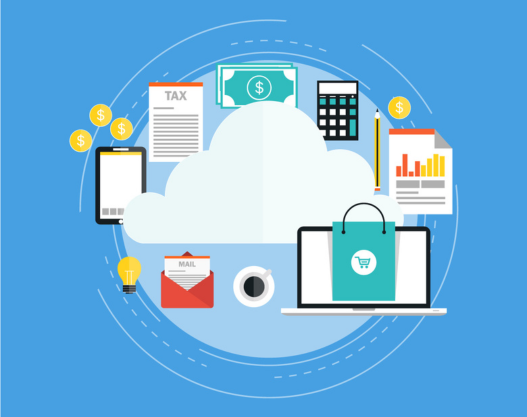
Common Cloud Billing Surprises
Even well-managed systems may experience unexpected surprises, such as autoscale events.- More storage space because of log production
- Spikes induced by bad bot traffic
- Costs of integrating with third parties
- Test environments that were forgotten are still functioning in the background.
How to Avoid Overpaying for Cloud Hosting
You need to be able to see everything before you optimize anything. Now that you know what’s eating up your money, here’s how to keep prices down: 1. Set resource limits: Define clear resource caps so autoscaling stays predictable and under control. 2. Automate idle shutdowns: Turn off testing servers, unused environments, or workloads that aren’t being used outside of business hours. 3. Monitor real resource usage: Don’t only use graphs hidden in cloud panels; use dashboards that plainly indicate where the money flows. 4. Review storage regularly: Please remove any unnecessary backups, logs, snapshots, and temporary files. 5. Avoid unnecessary third-party add-ons: A lot of tools do the same things that your hosting service currently does. 6. Improve efficiency before scaling: Using cache, CDN, and optimized webpages can cut down on the burden on the backend by a lot.
How Dotzo Helps You Spend Less on Cloud Hosting
Most companies spend too much because traditional cloud providers make it difficult to understand prices. Dotzo approaches things differently by prioritizing clarity, predictability, and genuine value. Here’s what sets Dotzo apart:- Predictable Pricing: Stop getting surprising bills. You can always check Dotzo’s clear pricing to see what you will pay each month.
- No hidden usage spikes: We help you set up your resources correctly so you don’t waste money on autoscaling that you don’t need.
- Optimized infrastructure: Our servers are configured to provide outstanding performance while using fewer resources. This means you will receive more value from each unit of computing.
- Expert support included: 24/7 real engineers—not bots—who help you troubleshoot issues before they inflate your bill.
- Smooth scalability without financial shocks: Want to grow? Scale with fixed prices instead of variable fees that depend on your usage.
- Ideal for startups and growing businesses: SSmall and medium-sized teams do not require complicated dashboards or inconsistent invoices. Dotzo gives them exactly what they need: consistent performance at a fair and stable price.
Conclusion
The pay-per-use cloud model isn’t a bad system — but if you don’t track resource usage closely, it becomes expensive quickly. Overspending happens silently through idle workloads, misconfigured scaling, and hidden fees that most users never review. To stay flexible and financially smart, you need hosting that offers both performance and predictable billing. Dotzo helps businesses get the best of both worlds—transparent costs, optimized infrastructure, and support that simplifies cloud management instead of complicating it.
Stop Overpaying for Cloud Hosting
This ensures predictable pricing, faster performance, and support that genuinely helps you save money. Dotzo gives you transparent billing, optimized servers, and 24/7 expert assistance—everything you need to scale without surprise costs. Start Saving with Dotzo Cloud Server HostingIntroduction
5 out of 10 businesses regret their first digital marketing partner; here’s how to not be one of them. There are a lot of important things to think about when you employ a digital marketing agency. These elements can help you decide if working together will help your business grow or cost you money.
 Introduction
 These are the 8 key factors that will help you make a confident, no-regret decision.
1. How Well the Agency Understands Your Business
A trustworthy agency doesn’t just sell services. They dig into what you do, who your customers are, and what goals actually matter. Example: If the agency suggests running random awareness ads without understanding your appointment cycle or local competition, it should raise concerns. Quick Tip: During the first call, note how many questions they ask about your business. Curious agencies perform better.2. Their Industry Experience and Skillset
You want people who know what works in your space and what doesn’t. Experience can save you money, time, and help you avoid missteps. Example: An agency that has experience working with SaaS brands will already understand long sales cycles, lead scoring, and nurture funnels, rather than just providing generic “boost engagement” ideas. Quick Tip: Ask for a specific example of a client they have assisted in a similar industry. Not a theoretical explanation—an actual result.3. Clarity of Services and What You’re Actually Paying For
Many agencies bundle everything into fancy packages, but you need a clear understanding. Example: If they say “SEO included,” ask what that means. Is it on-page? Technical fixes? Backlinks? Content? Audit? Quick Tip: Please request a detailed breakdown of deliverables in writing prior to signing any agreements.4. Communication Style and Responsiveness
Projects don’t fail because of a lack of skill. They failed due to poor communication. Example: If you send a simple message and receive a reply after two days, consider how slow the campaign approval process will be. Quick Tip: Ask who your daily point of contact will be—strategist, account manager, or freelancer. One accountable person is essential.5. Their Creative Approach and Problem-Solving Ability
YYou want fresh ideas, not recycled templates that are used for every other client. Example: If you’re a local bakery, a creative agency might propose limited-period “early morning orders” campaigns or creator videos instead of the usual static posts everyone else is posting. Quick Tip: Request 2–3 campaign examples, not just the design, but the reasoning behind the idea.6. Their Tech Stack and Tools
Good agencies rely on data rather than guesswork. Ask them which tools they use to track performance. Example: If they run your ads, they must use tools like Google Analytics, Meta Ads Manager, SEMrush, or a CRM to measure leads. Quick Tip: If they say, “we track everything manually,” run. Modern marketing requires updated tools.7. Pricing Transparency and ROI Understanding
Cheapest isn’t the best. Most businesses overspend because they do not understand the expected performance from a marketing agency. Example: Paying ₹20,000 per month for “posting and boosting” without a revenue-focused plan is a waste of money. Quick Tip: Ask the agency what return on investment (ROI) looks like for your specific industry. IIf the agency refuses to provide even a range of deliverables, proceed with caution.8. Their Clients, Reviews, and Reputation
Past performance is the strongest indicator of future success. Example: Check how clients discuss the agency on Google, Clutch, social media, or in case studies. One negative review isn’t an issue; a pattern is. Quick Tip: If an agency is proud of its work, it will happily share references with you. If they hesitate, that’s your sign.Conclusion
Choosing the right marketing agency doesn’t have to feel like guesswork. Please refering to the checklist above, ask the appropriate questions, and you will be well-equipped to identify the agency that can truly support your growth.For more such informative Blogs visit our Website – www.dotzo.net
Introduction
Linux drivers have some good and some bad things about them.This is incredibly crucial for anyone who runs a business, produces apps, or runs a server that needs reliable hosting. This is an explanation of the topic by someone who knows a lot about it, along with some suggestions for how dotzo.net’s services can help with usual Linux driver difficulties and make the most of the benefits.A look at drivers for Linux
Linux device drivers are special programs that let hardware work with the Linux operating system.They link graphics cards, storage devices, and network cards to the kernel, which makes it simple for software to use them. The most important things to know about Linux drivers are- A lot of hardware support: Modern Linux works with more hardware than any other operating system, which makes it one of the greatest platforms for PCs and servers.
- Open Source’s Flexibility: Many Linux drivers are open source, which means that anybody can help build them and correct faults rapidly.In open ecosystems, people can solve problems more quickly.
- Peer Review and Security: Other developers check the Linux kernel driver code to make sure it is safe and fulfills specific standards.You can quickly detect and repair bugs.
- Modular Kernel Approach: Loadable Kernel Modules (LKMs) enable you add and delete drivers whenever you want.This means that upgrades take less time and it’s easier to maintain the system working smoothly.
- Cross-Platform Compatibility: Most Linux drivers are promptly updated to cope with new architectures, like when systems migrate from 32-bit to 64-bit.This makes sure that they will work with a lot of different devices in the future.
- Linux has a stable userspace interface which means that user programs will keep working with it even if the kernel and driver code change.
- Linux-based IT setups can save a lot of money on the total cost of ownership by using open-source drivers and not having to pay for licenses.
Drivers for Linux have issues
There are a lot of good things about Linux drivers, but there are also some undesirable things to think about:- Driver APIs that don’t always work the same wayz: Linux doesn’t guarantee that the driver API or ABI will work the same way in all versions of the kernel.You might need to rewrite or update your code when the kernel updates.This has an effect on both persons who design devices and people who use old or modified drivers.
- Some hardware makers take a long time: To release open-source drivers for their newest devices.This makes it tougher to support new technology, and customers have to discover ways to work around it.
- Delays in Deployment: It could take months for a driver to show up in commercial Linux distributions after it is added to the mainline kernel.This could make it harder to receive new features for your device.
- Learning Curve: It could be hard for less experienced administrators to set up unique hardware because designing, setting up, and fixing Linux drivers can be hard for people who aren’t particularly adept with computers.
- Support that isn’t always there: There are a lot of various distributions and kernel versions, which might make things tricky to work with, especially if you have specific hardware or installations.
- Real-life examples: If a business installs new SSD storage arrays, they might be able to get help with the Linux kernel straight away because it is open source. But if the hardware vendor doesn’t have a Linux driver ready right away, tech teams may have to come up with temporary workarounds or wait to launch until support improves.
How Dotzo makes it simple to use Linux drivers
Dotzo knows how to build up Linux hosting environments that work well with Linux drivers and fix any problems that come up with them:>Enterprise SSD Storage
Dotzo servers employ reliable enterprise SSDs, which implies that the hardware is chosen for its performance and ability to work with Linux. >Full Root Access
You have complete access over your Linux VPS, so you can install, update, or replace drivers whenever you want without any restrictions. >Dedicated Premium Support
- Dotzo.net’s support team is always available to help you with driver issues or compatibility problems, so you can always obtain expert help when you need it.
- Integrated DDoS protection and firewall groups are two examples of proactive security techniques that help minimize the dangers that come with problems with network drivers.
- Most of the newest technology already has good support for kernel drivers, which makes it easier to set up.It has the latest Intel Xeon processors and a network that works quite well.
- You don’t have to sign anything, and you can pay anyway you want. With our 30-day money-back guarantee, you can check out various hardware setups without worrying about losing money.
>Easy Upgrades
When driver updates are available, your server will function with any new hardware you add to it right away. This includes graphics cards, network cards, and storage. Conclusion
Linux drivers can speed up, protect, and expand your infrastructure, but only if you know how to use them and have the right setup. Dotzo.net’s Linux hosting services make things easier and safer by giving you fully managed solutions, better hardware, dedicated technical support, and full root access.These features help your business get the most out of Linux driver technology while avoiding common difficulties.

Introduction
Infographic marketing is a tried-and-true technique to get people interested in content that looks good, cut through all the information we have today, and make hard ideas easy to understand. Infographics may help companies attract more people to read their content, remember their brand, and visit their website. When they use a reliable hosting and distribution solution like dotzo.net, their digital stories become even more intriguing and easy to remember.What does it mean to use infographics in marketing?
Infographic marketing uses bright pictures to make it easier to understand information, steps, or stories right away. People can see visuals 60,000 times faster than they can read words. This is why infographics work so well to get people to pay attention, remember things, and share them. Infographics are not only beautiful, but they also get people to do things by turning data into attractive pictures. What do infographics do that makes them work?
On social media, infographics get up to three times as many likes and shares as ordinary articles. They are also thirty times more likely to be read all the way through. Here are some great things about them: > Making things easier to understand: Infographics put facts, step-by-step instructions, or technical challenges into pictures that are easy to comprehend.
> Getting more people to talk to each other: Bright design and short stories keep people interested and make them want to share. This makes material more potent and visible on all media.
> Making the brand simpler to recall: Customers are more likely to remember and trust a company over time if its infographics use the same colors, logos, and design.
> SEO and website traffic: Infographics are easy to share, which can gain you solid backlinks that will help your site rank higher and attract more visitors.
Important graphical trends for 2025
Digital developments show that infographics are still highly useful:- By changing the material to reflect what consumers desire, personalized data visualizations make infographics more useful and easier to share.
- More and more people are using micro-content forms like Instagram Reels and short, data-driven images on social media. This is why it’s so crucial to utilize easy-to-understand infographics to share information.
- Mobile-first designs make infographics more useful because more people use their phones to find information.
Infographics are an element of marketing these days
Infographics make information that is hard to understand or complicated into fun stories that are easy for new businesses, online stores, and well-known brands to get. Companies who make infographics get a lot more interaction, keep more of their important messages, and get more conversions from visual call-to-actions, according to case studies. The best ways to use infographics to sell products
- To get the most out of using infographics for marketing:
- Find out who you want to reach and pick topics that are important to them.
- To get them to the end, tell stories that are easy to understand and exciting to read.
- Make sure your design is obvious and your branding is the same so that people can comprehend it right away and remember it for a long time.
- Adding structured HTML code, keywords, and alt text might make it easier for users to find and use your site.
- To reach the most people, spread your message throughout all of your digital platforms, such your blog, landing pages, emails, and social media.
How dotzo.net uses infographics to improve marketing
- For graphical information to be most useful, it needs a robust base. Dotzo.net could help businesses and people who generate content in the following ways:
- Fast and safe hosting allows pages with a lot of media load quickly, which is vital for keeping visitors who desire infographics happy.
- Bandwidth and resources that can grow to handle sudden spikes in viral traffic when infographics get people talking and connecting to them.
- Your graphics and data visualizations will always be safe and available since they are always up and running.
- Your marketing site or content hub will always perform at its best with help from skilled tech support. This manner, you may focus on strategy instead of solving problems.
- Dotzo’s web hosting and server services make your marketing as dependable and wide-ranging as a pro’s. This is true whether you’re utilizing infographics to raise awareness, adding dynamic data displays, or making your website mobile-first.
Conclusion
Infographic marketing isn’t just a passing trend; it’s a terrific tool for any business to make its content better and its brand stronger. If you choose the right hosting partner, like dotzo.net, your visual material could help you grow, get more people to connect with it, and see results that can be tracked in 2025 and beyond.

Introduction
Social impact can help you get forward at work, make new friends, and build trust that lasts in today’s corporate world. You need to know how to use social influence well if you are a business owner, freelancer, or corporate leader. This article lists ten tried-and-true strategies for professionals to increase their social influence. It also talks about how dotzo.net services can help your business grow online.- Get involved and help others: You can’t just post on social media; you have to talk to people too. Commenting on other people’s posts, offering helpful information, and celebrating your network’s triumphs are all great methods to interact with people in person.
- Give something new and useful to someone else : When it comes to material, the best is new and useful stuff. Tell them about your original thoughts, what you’ve learned, and useful advice that can benefit them. If you regularly post good material, you will become a thought leader and earn more followers and shares on social media.
- You need to be up to date on trends to become a thought leader: Stay up to date on what’s going on in your field and share your thoughts or analysis. If you are one of the first to comment on or forecast a trend, people will trust you more and keep coming back for your expert opinion.
- Get to know those who have power: Influencers assist you make your message. To build real relationships, participate with their material and work together when you can. If influencers share your things or promote you, it can help you reach more people and improve your reputation.
- Be kind and humble: You need to be able to trust people if you want to be in charge of them. Be nice and humble when you respond to comments and messages. If you are easy to talk to, people are more likely to believe your advice and get in touch with you.
- Concentrate on a few platforms: Instead of trying to reach your professional audience on all of them, pick the ones where they are most active. When you have a strong presence on particular channels, it’s easier to talk to the proper people and have better interactions.
- Use content that is both visual and viral: Videos, infographics, and memes are better at getting people’s attention than just text. Spend money on making visual content that people would want to share. When something you post becomes viral, you get a lot more followers and power.
- Go to or host events: You can show off what you know and meet people outside of written articles by doing webinars, live Q&A sessions, or going to virtual events that are connected to your industry. Events are a great opportunity to meet new people and learn new things.
- Make and leverage networks: To grow your professional network, you should make important interactions with people every day. Attend industry events, join online organizations for professionals, and build these contacts over time. Your network provides you a lot more social influence through association.
- When you discuss about yourself, be honest: Be honest when you talk about your achievements and milestones. You might receive more attention if you do things like praise your team’s accomplishments or make case studies without sounding like you’re bragging. It shows that you are a strong leader to the people you are speaking to.
How Dotzo.net Can Help You Have More Social Power
You need a strong online presence to change the world. That’s when dotzo.net comes in:> Cloud and VPS hosting that you can trust
- Make sure that your blogs, personal brand website, or online portfolios are always easy to discover and load quickly. Dotzo.net has a high uptime, which means that your material is constantly available and impresses visitors. This is good for SEO and building trust.
- DDoS protection and SSL certificates make your online presence safe. This will make your audience feel at ease and professional when utilizing your platforms.
> Data Centers for Global Reach
With servers all around the world, you can reach people in other countries faster. This will speed up load times and make you more involved across the world.> 24/7 Expert Help
dotzo.net is there for you 24 hours a day, 7 days a week to help you with any technical problems you might have. You may focus on making content and growing your network.> Infrastructure that can grow with your business
As your brand increases, so does your power. You can easily move from VPS to dedicated servers, which can manage more traffic and content needs.Conclusion
Networking, creating original material, getting people involved, and effective self-promotion can all help you have more professional social influence. Dotzo.net’s fantastic web hosting services can help you develop a powerful and versatile online presence that will help you become a well-known and trusted leader in your sector. You should start using these tried-and-true methods right away to see how much stronger you get.

Introduction
Streaming takes up a lot of bandwidth and other resources. Shared hosting or VPS usually doesn’t function well because everyone has distinct needs and there aren’t many ways to customize them. Dedicated servers provide you full control over your resources, which lets you make big improvements, keep your bandwidth stable, and keep your performance steady.These benefits make sure that
- There is no lag or buffering, even when the load is heavy.
- Always sending high-definition feeds (HD, 4K, VR).
- More safety and compliance for material that is high quality.
- You can change the server’s settings and software.
- Scalability for bigger events and more guests.
High Core Count CPU
This is what you need to be able to transcode in real time and handle several streams at once.Big RAM
To hold data, buffer it, and let a lot of people access it at once.SSD or NVMe storage
Quick access to drives for VOD and live streaming. NVMe has even less latency. Plans with at least 1Gbps, but ideally 10Gbps, of unmetered or high bandwidth, with no data limits that stop you from using too much data to keep the quality of your streams from going down.DDoS Protection and Security
Stops bad attacks that could otherwise bring down broadcasts and keep them functioning smoothly.99.99%+ Uptime SLA
This guarantees that channels and live events are always up and running.Simple to use and grow
Quick provisioning, sophisticated control panels, and fast upgrades are all vital.Here’s why Dotzo.net is an excellent place to stream
Intel Xeon CPUs with enterprise SSD storage make it easy to quickly and reliably access and deal with data. Unmetered Premium Bandwidth: 1Gbps (upgradable) network lines that are dedicated to streaming HD and 4K video. 24/7 DDoS Protection: Automatic 40Gbps filtering keeps streams safe from attacks that could shut down service.Full Root Access and SolusVM Control
You can manage your software, codecs, security policies, and restart or reinstall whenever you want.Managed Support Options
Offers fully managed services for streaming organizations that don’t have a lot of tech resources. These services include setting up cPanel, helping with software, and keeping an eye on your system before problems happen.Free Migration
Existing streaming services can join without any downtime. You don’t have to sign anything, and you can get your money back in 30 days. Monthly pricing and risk-free trial periods are good for both new and seasoned streamers.Dotzo dedicated servers are perfect for
- Over-the-top streaming services like Netflix
- Live events including sports, concerts, and conferences are being shown on TV.
- There are always radio or TV channels on the internet.
- Video libraries on EdTech websites
- Games and esports competitions
- VOD and TV platforms to catch up on
- It also helps with security (firewall and DDoS) and scalability (upgrades and expansion), which are always changing to keep up with streaming.
How to Stream with Dotzo
Figure Out How Much Bandwidth You Need To stream in high definition and 4K, you need a lot more bandwidth. On Dotzo.net, you can start with 1Gbps and add more as you need bandwidth.Deploy Fast
It doesn’t take long to set up servers—usually less than a day—so more streams could come up shortly.Optimize Storage
For apps that need a lot of input/output, use SSD or NVMe. For recorded content, use HDD storage.Set up Software
Broadcasters can install the streaming stacks, codecs (such H.264 and H.265), and real-time encoding software they need if they have full root access. With Dotzo’s specialized administrative panel with SolusVM, you can keep a check on your streams and easily handle reboots, scaling, snapshots, and more.Support
It’s hard to know how much streaming you’ll need. With Dotzo.net’s managed plans, you can always get help from skilled engineers with scaling, fixing problems, and keeping everything running smoothly.Conclusion
A dedicated server is the most important part of a professional streaming platform that can grow with your needs. The best servers for streaming in 2025 will feature unlimited 1Gbps+ bandwidth, powerful CPUs, business SSDs, and better security. These are just a few of the things that make Dotzo.net a great alternative for streaming without buffering. Dotzo.net can tell you how strong devoted streaming is. Businesses and creators can always interact with, entertain, and reach people all over the world thanks to always-on performance and support.